UX Case Study · Amazon Seller · Pattern
Reimbursement
Management Tool
Amazon loses inventory. Getting paid for it was a 30-minute manual chore, and a vendor skimmed 10% of every recovery. I designed the tool that took both away.
- Role
- UX Designer
- Team
- 7-person Scrum
- Cadence
- 2-week sprints
- Surfaces
- Web app + Chrome plugin
Time to file one claim — both bars, one scale, one tick per minute
By hand
30 min
With the tool
60 secone tick
01The problem
Money leaks at five points, and nobody was watching
A unit crosses Amazon's network and can vanish at any stage. Each leak lives in a different report, so nobody could see the whole picture.
Inbound
Truck to warehouse door
Leak
Lost during inbound shipment
Show what never arrived, what Amazon already paid back, and file for the rest.
Found in Shipment Reports
95% of case volume — MVP led here
Warehouse
Units sitting in FBA
Leak
Lost in warehouse
Find units gone missing inside FBA from reconciled vs. unreconciled data.
Found in Inventory Ledger
Leak
Damaged in warehouse
Separate units Amazon auto-credited from ones still owed.
Found in Inventory Ledger
Fulfilled
Picked, packed, shipped
Leak
Fulfilment fee overcharged
Catch fees billed on the wrong dimensions or weight.
Found in Fee Preview
Returned
Back from the customer
Leak
Return never reimbursed
Surface returns Amazon owed for and quietly skipped.
Found in Reimbursement Reports
Amazon offers no discrepancy detection and no auto-filing. Every claim meant navigating Seller Central by hand, uploading proof one document at a time, then chasing statuses. Competitor analysis — Helium 10, Seller Investigators, Amazon's own features — showed the same gap: nobody automated the filing.
02What it cost
A vendor took a tenth of every dollar recovered
Pattern outsourced recovery. The fee scaled with success — the better it worked, the more it cost.
Every dollar recovered — one tick per 10%
Via vendor
$1.5M/yrthe red tick, leaving every year
In-house
$0vendor retired, 100% kept
03Synthesis
Sixteen complaints became three questions
Interviews and questionnaires went onto an affinity wall, clustered into four themes, then got reframed as design questions.
Workflow friction
4- Manual report reconciliation
- Repetitive data lookups
- Tedious Amazon UI navigation
- No central comms log
Data & reporting
4- No unified dashboard
- Manual value-difference maths
- Data split across reports
- Reimbursed vs. not, unclear
User pain
4- Hours lost daily
- Fear of missed money
- Overwhelmed by volume
- No case prioritisation
Tool limits
4- No discrepancy detection
- No auto-filing
- No alerts or triggers
- Spreadsheet dependency
Automation
How might we cut the repetitive filing effort and survive Amazon's frequent UI changes?
Visibility
How might we show claim status and the highest-value claims without digging?
Decision support
How might we tell users which claims to chase first?
04The flow
Six steps, three actors, nothing implicit
Swimlanes pinned every user action to the system response behind it. Filled dots mark who is working.
You
Open the dashboard
Pick the top case
Check the discrepancy
Hit File Case
idle
Close the case
The tool
Pulls Shipment, Ledger & Reimbursement reports
Ranks every case by potential value
Computes shipped vs. received, and what it's worth
Autofills the form, attaches POD & BOL
Logs the reply into case history
Reconciles a partial payout
Amazon
idle
idle
idle
Receives the case
Responds
Pays out
Scroll the table →
Same pattern, five flows
05What I built
Triage it, understand it, file it
Three surfaces. The dashboard ranks by money, the detail view holds one claim's whole story, the plugin files it inside Amazon.
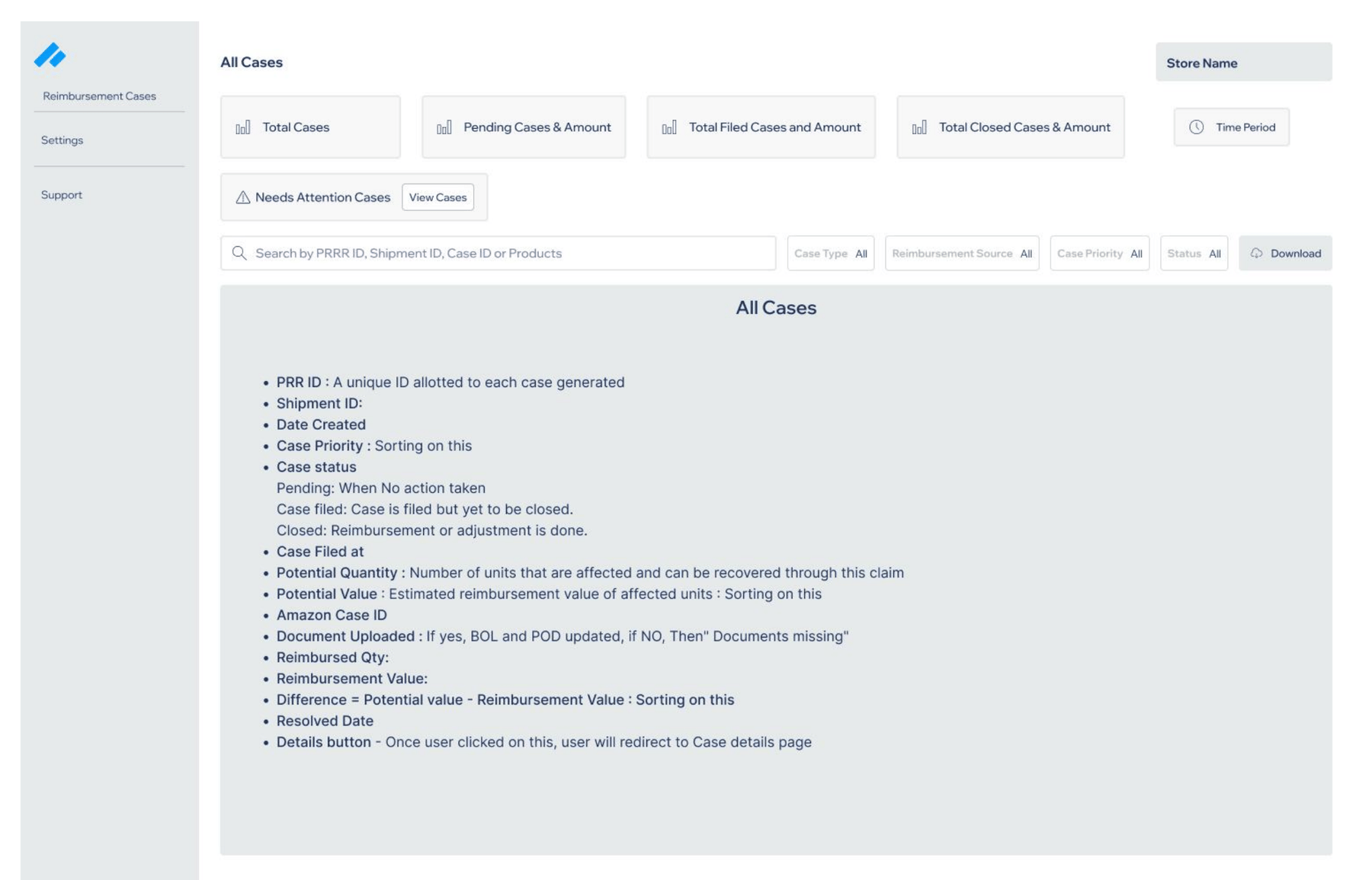
Surface 01
Case dashboard
Opens on the money: Potential Value and Difference columns rank what to chase first.
- Total, pending, filed, closed — upfront
- Filter by type, priority, date
- Search by PRR, Shipment or Case ID
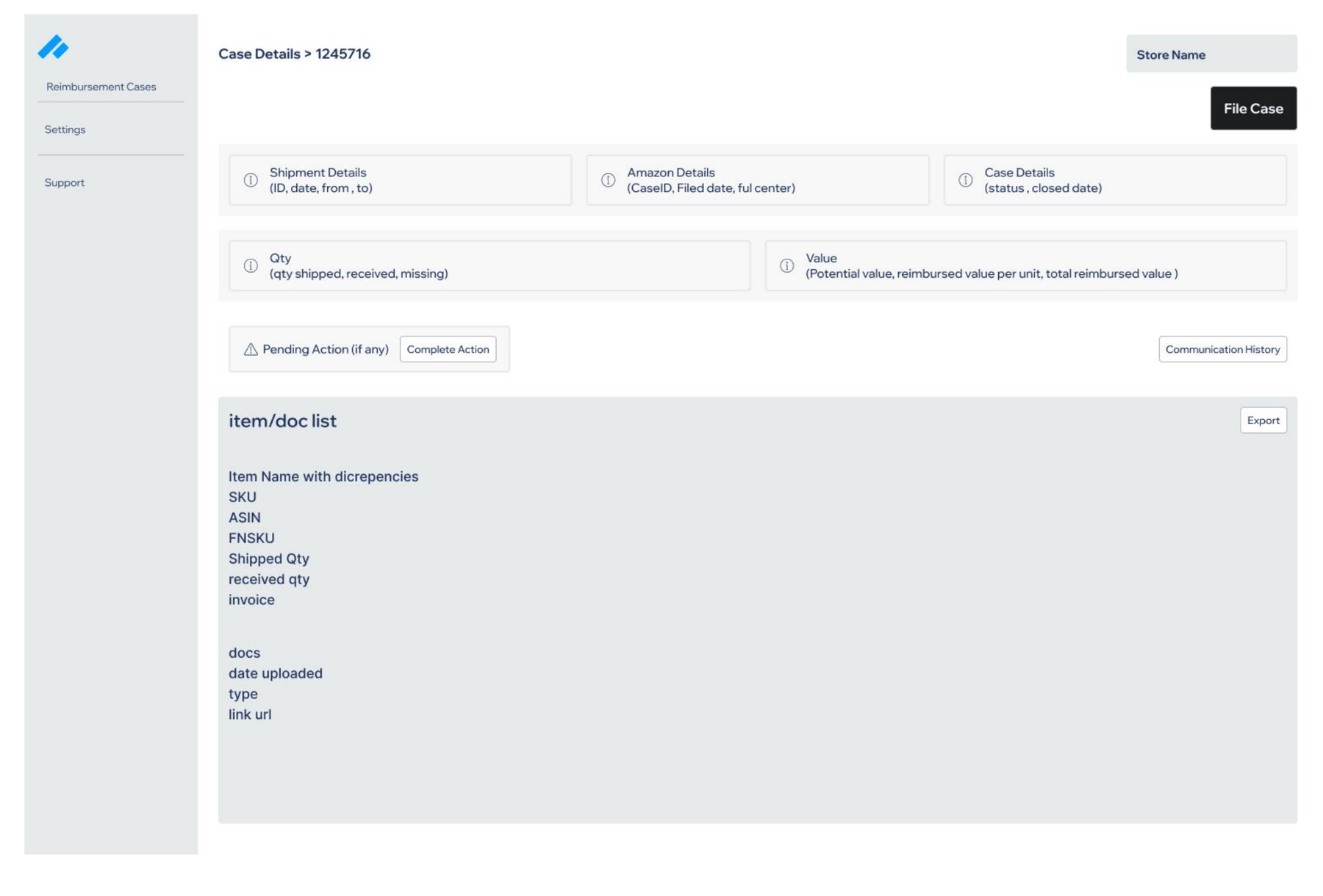
Surface 02
Case detail
One claim, four groups: Shipment, Amazon Case, Status, Affected Items — with the action button in context.
- Item-level shipped vs. received, valued
- Communication history with Amazon
- File Case and Complete Action in place
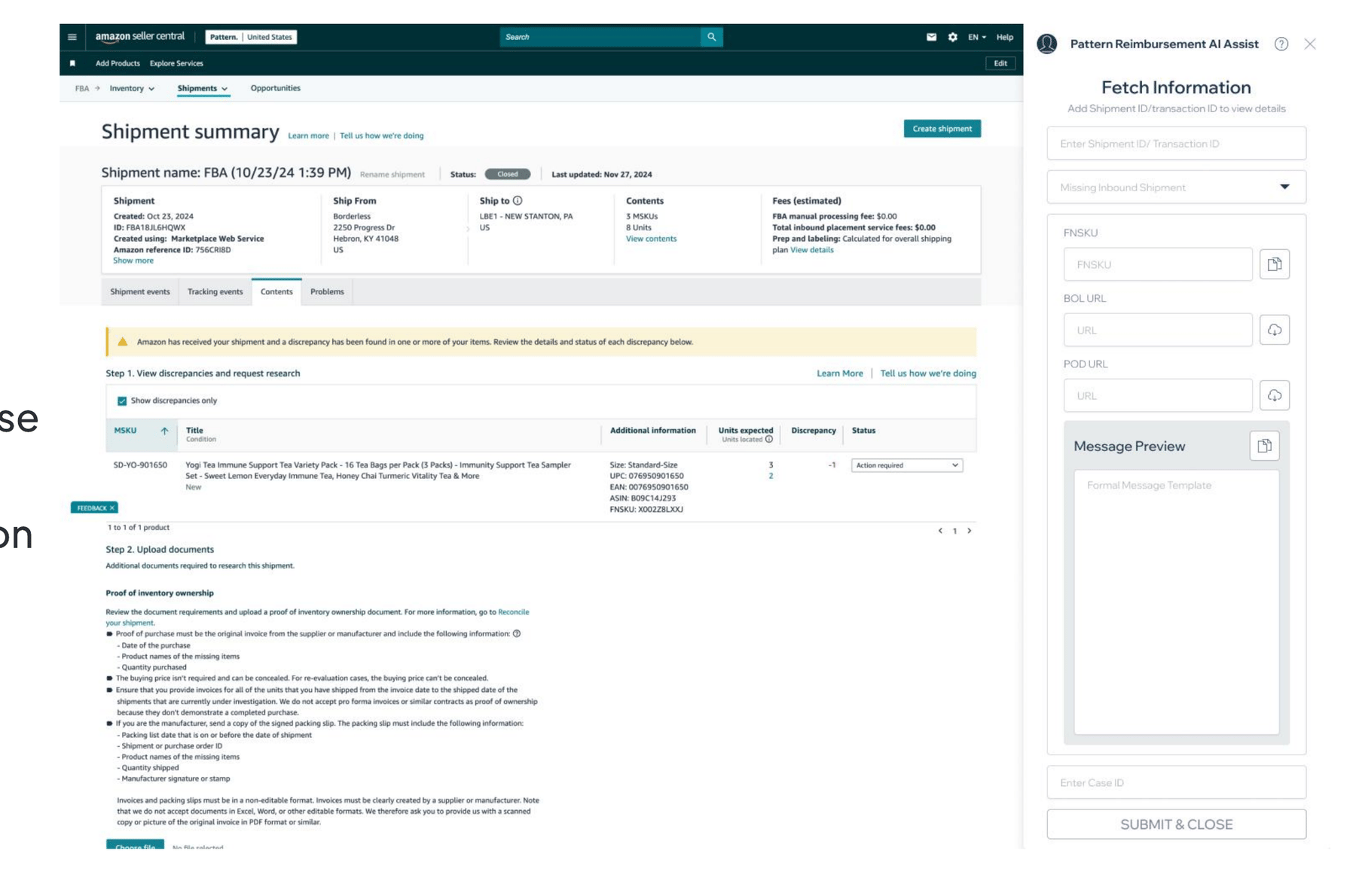
Surface 03
Chrome plugin
Sits on Seller Central's Shipment Summary page and looks native, so filing never leaves Amazon.
- Shipment ID, FNSKU, BOL, POD, pre-written message
- Auto-fetches discrepancies via API
- Built to survive Amazon UI changes
06How it shipped
Research ran on the sprint clock
Four sprints, each ending on a number that moved.
01
Discovery & baseline
- Stakeholder workshops
- Seller Central API & report audit
- Internal questionnaires
5
case types scoped and ranked by payout
02
Design sprints
- Prototyped the Lost Inbound flow
- Usability tests with internal teams
1
flow simplified — the partial-payout Close Case path
03
Enhanced usability
- Sessions with 8 internal users
- Post-sprint surveys
90%
usability · manual filing down to 4% · 30 min → 60 sec
04
Performance
- Pre-validation on API-backed forms
- Final usability round
97
usability score · materially faster data fetches
Trade-off
Reconciling 4+ pricing reports properly vs. hitting sprint deadlines.
Shipped Shipment Reports first, deferred low-value edge cases.
Trade-off
Keeping the Chrome plugin alive through Seller Central UI changes.
Real-time testing with developers inside every sprint review.
The seven who built it
07Proof
Tested on both surfaces before rollout
The web app for data accuracy, the plugin for real filing inside Amazon.
Web app
- 98%
- data accuracy across 80 simulated sessions
- <10 s
- to review a case and select File Case
Chrome plugin
- 95%
- filing success, under 2% error rate
- ~60 s
- end to end — screen, fetch docs, upload, file
08Impact
Minutes became seconds, and the money followed
Per claim, down from ~30 min
Vendor cost eliminated
Reimbursements captured
Tasks a team can support
Next — phase 2 opens the tool to external sellers
- 01Marketplaces beyond Amazon
- 02SaaS release for 1M+ sellers
- 03ML discrepancy prediction
- 04Real-time dashboard alerts
- 05Reimbursement trend analytics
- 06Infrastructure for 200% data growth